

Video Tutorials & How to Guides
How to Guides
Bangor Treasury Management User Guide
Use this guide as your complete go-to reference for information and instructions for your online banking experience beyond the videos below.
Transition Guide & How to Prepare
We've put together a comprehensive guide to help you with the conversion.
Video Tutorials
First-Time Login
Dashboard
Administration
Check Positive Pay
Settings & Alerts
Mobile Overview
Wires


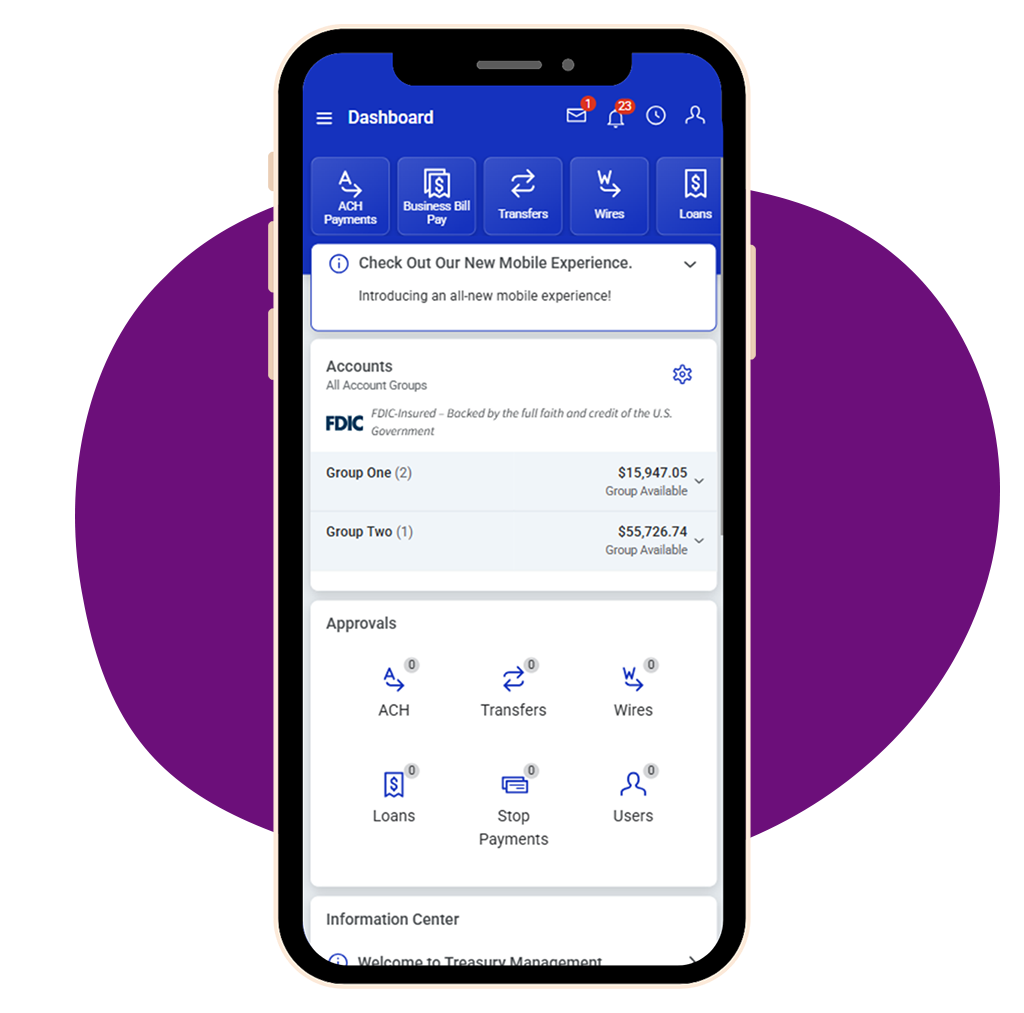
Download the Bangor Treasury Management App
Securely manage your Bangor Savings Bank accounts from your mobile device
New Features of the Bangor Treasury Experience
Built around your feedback, Bangor Treasury Management introduces new features designed to simplify workflows, improve visibility, and give you greater control over your banking.
- NEW Mobile App: Everything our largest business customers need in a secure mobile app; to access your accounts on the go
- NEW Quicken/QuickBooks Integration: Connectivity with tools like Quicken/QuickBooks to help businesses work smarter
- NEW Enhanced Loan Payment Options: Ability to specify interest or principal only payments in addition to regular loan payments
- NEW Messages: Contact your Cash Management Solutions Sales Officer within the secure Bangor Treasury Management platform and receive push and in-app notifications
- NEW Real-Time Account Information: View your account balance and transactions as they happen in real time
- NEW Direct IntraFi Access for ICS statements
- NEW Modernized Statement Design for improved clarity and layout

We're Here to Support You Every Step of the Way
We know transitions like this come with questions and appreciate your partnership and the trust you place in Bangor Savings Bank. We look forward to supporting you and will continue to provide timely updates as the conversion approaches. If you have questions, please contact your Cash Management Solutions Support Team at 1.888.276.8723.
Frequently Asked Questions (FAQs)
-
The upgrade to Bangor Treasury Management will be complete on Monday, July 13, 2026. Please follow the below steps to log in for the first time.
- Download a secure (Symantec) token, based on your preference of use. The token will be required for certain transactions within Bangor Treasury Management.
- Smartphone Access: Search ‘VIP Access’ within the app store on your mobile device and download the Symantec application.
- Desktop and Tablet Access: Virtual tokens can be downloaded to company workstations. For instructions on how to download desktop or tablet tokens, visit http://idprotect.vip.symantec.com
- Click the Digital ID enrollment link from the Online Enrollment Information email or copy and paste it into your preferred browser. This email will come from donotreply@jhtm.bangor.com. If you do not receive it, please check your spam folder or call 1.888.276.8723.
- Enter your current Customer ID in the Company ID field. Enter your current User ID in the Login ID field.
- Click ‘Create my Bangor Savings Bank ID’.
- Verify your profile information and complete the required information.
- Create your Bangor Savings Bank ID credentials. These are the credentials you will use to log in going forward.
- Choose which two-factor authentication you want to use when you log in to Bangor Treasury Management. Follow the prompts to set up the applicable verification method selected.
- Follow the prompts to register the secure (Symantec) token. DO NOT click ‘Remind me later’
- Read and Accept the Terms and Conditions.
- Once you Accept the Terms and Conditions, you will be taken to your Company’s dashboard.
To access our First-Time Login, step-by-step video and tutorial, visit the “Tutorials & How to Guides” section below.
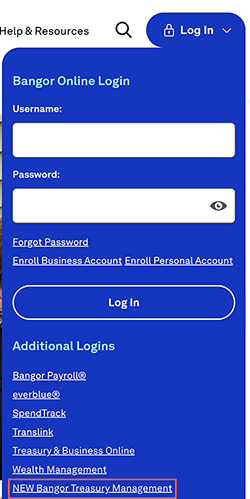
After you have logged in for the first time using the instructions above, you can log in on bangor.com by navigating to the ‘Log In’ button at the top right corner and selecting ‘NEW Bangor Treasury Management’ under the Additional Logins section.
- Download a secure (Symantec) token, based on your preference of use. The token will be required for certain transactions within Bangor Treasury Management.
-
Once you have successfully logged in through your desktop, you can download the Bangor Treasury Management mobile app and log in.
- Download the Bangor Treasury Management mobile app from the App Store® or Google Play. Scan the QR code to get started
- Log in using your Username and Password.

-
Treasury Online will move to Bangor Treasury Management on July 13, 2026. On July 13, 2026, you will be unable to login to Treasury Online and can begin accessing your account via Bangor Treasury Management. As we get closer to this date, you will receive more information, including the Bangor Treasury Management login link and information. -
To prepare, please review, sign, and return your Cash Management Solutions Principal Agreement and Appendices by Tuesday, June 30, and complete the following items prior to Friday, July 10, 2026:
- Confirm your contact information
- Update users and permissions
- Clean up templates and reports
Complete these tasks in Treasury Online -
The following items will transition to Bangor Treasury Management:
- Your Company information including your Users, User Permissions, Contact Information, and Account Nicknames
- Online services: ACH Origination, Check Positive Pay, ACH Positive Pay, and Wire Origination
- Future Dated, Scheduled/Recurring Internal Transfers
- Access to view and manage your accounts
- ACH Origination Templates
- Account transaction history from the last 90 days
- Historical eStatements (We recommend downloading copies for your records.)
- Tax documents from the last 3 years (We recommend downloading them as it may be up to 60 days before you can access them.)
-
The following items will not carry over to Bangor Treasury Management and, if applicable, will need to be set up again starting July 13, 2026.
- Your password
- Positive Pay file mappings
- Wire Templates
- Recurring ACH payments
-
When the upgrade to Bangor Treasury Management is complete on Monday, July 13, 2026 at 8:00AM, you will use the following link to log in: treasury.bangor.com -
Once you have successfully logged into Bangor Treasury, please complete the following items, as applicable, to ensure your online banking services are reestablished correctly. If anything appears incorrect, contact our Cash Management Solutions Support Team at 1.888.276.8723 for assistance.
- Make Your Dashboard Work for You: Your home screen is completely customizable. Be sure to add the accounts you use every day by selecting Manage Groups then Add Accounts.
- For a step-by-step guide to tailor your dashboard, view the Dashboard video and tutorial in the “Tutorials & How to Guides” section below.
- Review Your Details: Review your Company and User information to ensure everything is accurate.
- Confirm Your Accounts: Review your accounts and account information to ensure everything has transitioned correctly.
- Review Your Online Services: Review your online services, such as eStatements, ACH Origination, Wire Origination, Check Positive Pay, and ACH Positive Pay, to confirm all services you previously accessed through Treasury Online have transitioned successfully to Bangor Treasury Management.
- Map Your Check Positive Pay Files: Review and map your Check Positive Pay files to ensure they align with the required file format in Bangor Treasury Management. This step is necessary for continued and accurate processing.
- Recurring ACH Payments: If you originate recurring ACH payments, set up your scheduled ACH Origination transactions in Bangor Treasury Management. This ensures your regularly scheduled payments continue to process without interruption.
- Establish Your Wire Templates: If applicable, please establish your wire templates in Bangor Treasury Management. This will ensure accurate and timely wire processing following the transition.
- Verify Scheduled Internal Transfers: Review future-dated scheduled/recurring internal transfers to confirm they have transitioned correctly. This ensures your funds move as expected following the transition.
- NEW! Connect Your Banking to Intuit—Fast, Secure, and Seamless: Sync your business accounts with QuickBooks and other Intuit products.
- For a step-by-step guide on how to sync your business accounts, view the applicable Intuit guides in the “Tutorials & How to Guides” section below.
- Make Your Dashboard Work for You: Your home screen is completely customizable. Be sure to add the accounts you use every day by selecting Manage Groups then Add Accounts.
-
After the conversion on Monday, July 13, 2026, users will be unable to access Treasury Online. -
If you have questions or need help navigating the new system, please contact your Cash Management Solutions Support Team at 1.888.276.8723.